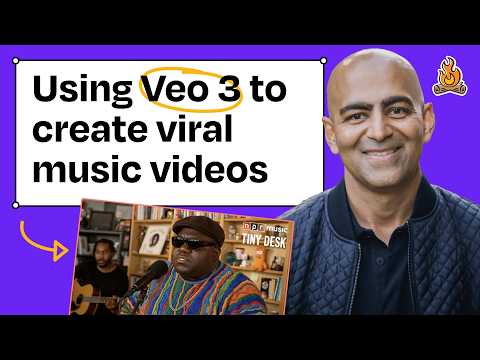
Using Veo 3 to create AI-generated music videos, like a Tiny Desk concert with Notorious B.I.G.
Anish Acharya (guest), Claire Vo (host)
In this episode of How I AI, featuring Anish Acharya and Claire Vo, Using Veo 3 to create AI-generated music videos, like a Tiny Desk concert with Notorious B.I.G. explores building AI music videos, cataloging books, and automating personal workflows Anish Acharya demonstrates how today’s AI tools make once-impossible creative projects—like generating a Tiny Desk-style performance for a deceased artist—fast and accessible.
Building AI music videos, cataloging books, and automating personal workflows
Anish Acharya demonstrates how today’s AI tools make once-impossible creative projects—like generating a Tiny Desk-style performance for a deceased artist—fast and accessible.
He walks through a simple pipeline: generate a still image with GPT‑4o, pull and edit audio from YouTube, optionally separate stems (vocals vs. instrumentation), and lip-sync/animate with tools like Hedra (or alternatives like Sync Labs).
He then shows how Veo 3 (via Google Flow) can generate short cinematic clips for a full music-video montage, with GPT‑4o assisting prompt iteration to lock in a specific aesthetic (e.g., 1990s Seattle grunge).
In a second workflow, Anish highlights Gemini Flash’s underused multimodal video understanding by building a small app in Google AI Studio that catalogs books (or records) from a quick “flip-through” video, and closes with consumer AI unlocks like Comet browser automation and AI in parenting/education.
Key Takeaways
A compelling AI music video can be built from a few modular steps.
Anish’s workflow breaks into reusable parts—still image generation, audio acquisition/editing, optional vocal/instrument separation, then video animation + lip-sync—making the process approachable and repeatable.
Get the full analysis with uListen AI
Use GPT‑4o as a “prompt co-writer” to converge on a precise aesthetic.
He starts with off-target generations, then asks GPT‑4o for keywords and phrasing to hit “1990s Seattle grunge” and progressively refines until the visuals become camcorder-like and grimy.
Get the full analysis with uListen AI
Constraints (short clips, limited durations) can increase creativity.
Both hosts note current tool limits (e. ...
Get the full analysis with uListen AI
Minimal prompts often work better than over-specification.
Anish repeatedly uses very short prompts (e. ...
Get the full analysis with uListen AI
Audio manipulation is a major unlock for remix culture workflows.
He emphasizes stem separation (e. ...
Get the full analysis with uListen AI
Multimodal video understanding enables “real-world-to-database” apps quickly.
Using Gemini Flash in Google AI Studio, he builds an app that extracts titles/authors from a short video by selecting relevant frames and running vision extraction—then can deploy via Cloud Run.
Get the full analysis with uListen AI
Agentic browser automation makes existing websites dramatically more useful.
With Perplexity’s Comet, Anish uses RPA-like assistance to interrogate accounts (e. ...
Get the full analysis with uListen AI
Notable Quotes
“It’s like the most creative satisfaction I’ve had in maybe my whole life.”
— Anish Acharya
“AI is just the next manifestation of sampling.”
— Anish Acharya
“We forget that this would be witchcraft three years ago.”
— Anish Acharya
“Something like this makes me almost want to cry… it always felt so inaccessible to get these amazing ideas… into a thing.”
— Claire Vo
“Abandon the branch and start over—because you didn’t actually do any work.”
— Anish Acharya
Questions Answered in This Episode
For the Biggie Tiny Desk concept, what specific guardrails would you use to make it “respectful and not derivative” (artist estate permission, labeling, revenue sharing, etc.)?
Anish Acharya demonstrates how today’s AI tools make once-impossible creative projects—like generating a Tiny Desk-style performance for a deceased artist—fast and accessible.
Get the full analysis with uListen AI
In Hedra (or Sync Labs), which settings most affect realism: face motion, phoneme/lip alignment, head pose, or prompt-emotion controls?
He walks through a simple pipeline: generate a still image with GPT‑4o, pull and edit audio from YouTube, optionally separate stems (vocals vs. ...
Get the full analysis with uListen AI
Can you share your exact GPT‑4o prompt iteration process for Veo 3—what keywords or references most reliably produce the “camcorder, grimy, 90s Seattle” look?
He then shows how Veo 3 (via Google Flow) can generate short cinematic clips for a full music-video montage, with GPT‑4o assisting prompt iteration to lock in a specific aesthetic (e. ...
Get the full analysis with uListen AI
When you layered Biggie vocals over a live cover-band track, how did you align tempo/key and handle timing drift so it feels like a coherent performance?
In a second workflow, Anish highlights Gemini Flash’s underused multimodal video understanding by building a small app in Google AI Studio that catalogs books (or records) from a quick “flip-through” video, and closes with consumer AI unlocks like Comet browser automation and AI in parenting/education.
Get the full analysis with uListen AI
What are the biggest tells you see in Veo 3 outputs today (e.g., duplicated people/jumps, object artifacts like the Camel pack), and what editing tricks hide them best?
Get the full analysis with uListen AI
Transcript Preview
It's like the most creative satisfaction I've had in my whole life. So I generated all these clips in a pretty straightforward way. I used GPT-4o to help me with the prompts, said, "Hey, help me capture grunge 1990s Seattle inspired by some of these music videos." And then, as you can see, it gets progressively more like camcorder, grimy. So I generated all this stuff, and then I threw it together into a music video. All right, let's watch it. [upbeat music]
You get the patented Claire Vo raised hands reaction [chuckles] on this one. I cannot believe this is AI-generated. It's so high quality. It's so specific in aesthetic, in a wardrobe, in emotion. You have inspired me. After this podcast, what music video am I gonna make? It's so much fun! [upbeat music] Welcome back to How I AI. I'm Claire Vo, product leader and AI obsessive, here on a mission to help you build better with these new tools. Today we have a fun and inspiring episode with Anish Acharya, general partner at Andreessen Horowitz and AI consumer investor. But we're not gonna talk about portfolio companies or the future of AI. No, we're going to use AI to build music videos, analyze our bookshelf, and help us plan our personal finances. Let's get to it. To celebrate twenty-five thousand YouTube followers on How I AI, we're doing a giveaway. You can win a free year to my favorite AI products, including v0, Replit, Lovable, Bolt, Cursor, and of course, ChatPRD, by leaving a rating and review on your favorite podcast app and subscribing to YouTube. To enter, simply go to howiai pod.com/giveaway, read the rules, and leave us a review and subscribe. Enter by the end of August, and we will announce our winners in September. Thanks for listening. This episode is brought to you by Notion. Notion is now your do-everything AI tool for work. With new AI meeting notes, enterprise search, and research mode, everyone on your team gets a note-taker, researcher, doc drafter, brainstormer. Your new AI team is here, right where your team already works. I've been a long-time Notion user, and have been using the new Notion AI features for the last few weeks. I can't imagine working without them. AI meeting notes are a game changer. The summaries are accurate, and extracting action items is super useful. For stand-ups, team meetings, one-on-ones, customer interviews, and, yes, podcast prep, Notion's AI meeting notes are now an essential part of my team's workflow. The fastest-growing companies like OpenAI, Ramp, Vercel, and Cursor all use Notion to get more done. Try all of Notion's new AI features for free by signing up with your work email at notion.com/howiai. Anish, I am so excited to have you here, and let me tell you why. It is because I have spent the majority of this podcast talking about enterprise B2B product management, how to manage your manager or manage yourself as a manager, or how to vibe code. That has been the topic of How I AI, and today we are just gonna have a little bit more fun. So why did you start to come to these AI projects that are a little less like work-related or technical and, and actually just a little bit more fun? How did you, how did you get here?
Install uListen to search the full transcript and get AI-powered insights
Get Full TranscriptGet more from every podcast
AI summaries, searchable transcripts, and fact-checking. Free forever.
Add to Chrome