uListen AI in ChatGPT
Great ideas
stay with you.
Remember the idea, but not where you heard it? Ask ChatGPT to find the passage, show who said it, and link you back to the moment.
Search quotes, transcripts, and summaries from uListen's curated catalog of YouTube podcasts.
No uListen account required.
Find the idea.
Search by topic, person, show, or a quote you half remember.
Read the words.
Get speaker-labeled transcript passages with links to the moment they start.
Explore an episode.
Paste a covered YouTube podcast link for summaries, key takeaways, and chapter links.
Get started
Start with a question.
- Open the uListen AI listing in ChatGPT.
- Select Install.
- Start a chat and try one of these prompts.
You can also ask for uListen by name: “Use uListen to find…”
Find your shows
Which podcasts can uListen search?
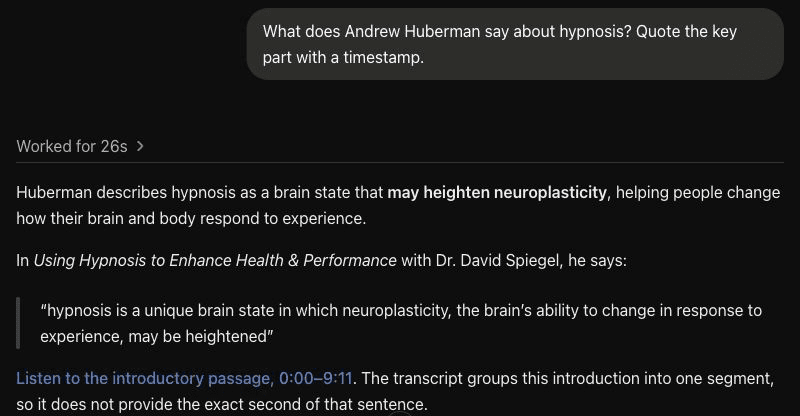
Find a quote
What does Andrew Huberman say about hypnosis? Quote the key part with a timestamp.
Explore an episode
Summarize this episode, and tell me what they're discussing at this point: https://www.youtube.com/watch?v=o_5f4N6Nq80&t=300
uListen searches its own curated catalog. It does not cover every podcast or YouTube video, and some catalog episodes do not yet have a transcript or analysis.
The plugin is read-only. It cannot save episodes to your library, download audio, or change the catalog.
Summaries are AI-generated and transcripts are machine-made. Names, technical terms, and speaker labels can be wrong. Check the original episode when a detail matters.
Need a hand? Visit support or email support@ulisten.ai. Read how requests are handled in our Privacy Policy.
Great ideas stay with you.
Bring the next one into your conversation.